Monday, November 7, 2011

Web Clipping - the easy way

I just saw this interesting app/site/service called Memonic. It lets you capture parts of websites, make notes, share your findings with others: in short, a great study-research-clipping tool. (See their Youtube tutorial here.) The free version is good for 100 notes, and 3 sharing with friends. To get more, you have to go with the paid, pro version. I'm presuming you can delete notes to makes space for new ones, especially if you are collecting info for a project. It might be fun to play with, but I can't see students paying for this service. Maybe a free "edu" version might get students hooked and eager to subscribe after graduation - just a thought.
  • Clip web content
  • Save webpages to read later
  • Write a note
  • Organize content directly from the Clipper
  • Use the Gathering Mode for lengthy research sessions
  • Take screenshots and save content from Word, PDF etc. with our Clipper for Windows
  • Forward e-mails and attachments to your Collection

Thursday, November 3, 2011

Another Flashcard site

Use This Powerful Study Tool 
http://quizlet.com/

Want to help your students retain vocabulary and concepts? Sometimes good-old-fashioned flashcards are the solution. Now you can use some tech to leverage this tried and true technique. Enter: Quizlet. Create flashcard sets with your own data or choose from sets created by others. Quizlet offers you the option of creating a group to share flashcards with classmates. (In addition, there are apps that integrate with Quizlet for on-the-go studying.) Another plus, data can be exported and pasted into Word or Excel.


  • Flashcard Mode for quick review.
  • Speller Mode uses audio as a prompt.
  • Learn Mode keeps track of scores, and retests incorrect answers.
  • Test Mode: with short-answer, matching, multiple choice or true/false options.


Friday, October 28, 2011

Another way to build flippable books

I must admit, I do like the idea of creating and distributing flippable digital magazines and books. There's something slick about the page flipping action, especially when accompanied by the sound of a page turning. (Although, sometimes, I do wonder about the real utility of creating the semblance of a book on a webpage..what's wrong with the webpage format? But that's just me...) I've mentioned a couple of other services before, and just recently came across "Youblisher". While it doesn't have all the bells and whistles that Issuu and others have, the view only shows your digital magazine. You don't have to worry about other "unsavory" or inappropriate content showing up on the sidebar. Youblisher is a snap to use: 1) create an account, 2) upload the PDF, 3) share the link - so easy. The one drawback that I can see is that you have no obvious way of viewing the content on an iOS device. (You can choose the download link, and open it as a PDF in another viewer, but it would be nice if the mobile view defaulted to PDF right away.) Youblisher give you the embed code (big and small) and a URL link.


Songbook(Link to a sample.)

You could get students to create their own magazine using whatever software package you prefer: Word, Publisher, InDesign, etc. Print it as a PDF and then upload. Newsletters, flyers, teacher-created textbooks, self-published stories...lots of ways to use it.

Thursday, October 20, 2011

Machine Generated Music


Do you want to use some music for a video clip or some classroom activity, but you want to avoid using a recognizable piece? Why don't you try "WolframTones". According to the site, "WolframTones works by taking simple programs from Wolfram's computational universe, and using music theory and Mathematica algorithms to render them as music."  Sometimes a tune will sound familiar, but rest assured that each tune is unique. You can adjust most of the parameters: tempo, key, mode, genre. Make it your own!


Tuesday, October 11, 2011

TodaysMeet Video Tutorial

Last school year, I blogged about TodaysMeet as a useful tool for setting up a back channel in your class or presentation. Russell Stanard has put together a nice Camtasia video that walks you through setting up this application. (When you go to his site, you'll have to wait a moment or so while the video screen loads.)

Saturday, October 1, 2011

Diagram it online

Take brainstorming to the Web using another cool web based app called Diagram.ly. You can plan for your class writing with Diagram.ly, a cloud-based visualization application. It's mind-mapping with a flow chart twist. Diagramly is free with no registration required.

Thursday, September 29, 2011

"Snack" Family of webapps

Earlier I wrote about Flipsnack as a way to present flippable books and magazines. In fact there is a whole family of "Snack Apps" to choose from. I tried Photosnack today and was very happy with the easy of use, and the ability to sign in using Google or Facebook rather than having to create a new account. It is a Freemium service, so to get all the features, you have to pay a little more. But it is a simple way to add a slick slide show to your blog or webpage.


Monday, September 26, 2011

Make Virtual Flipbooks the "Flipsnack" way

You can provide your students with beautiful flippable digital content by using Flipsnack. This great web-based app allows you to upload a PDF and see it rendered as a realistic onscreen book or magazine. You have a great set of choices for formatting and the full-screen view is very readable!


Monday, September 19, 2011

Popplet - mindmapping plus!

Popplet is an easy-to-use mindmap generator that creates slick conceptual maps. Add images, change the colour and embed your results on your blog or webpage. There is even a "play/presentation" feature that makes your Popplet work like a Prezi. Creations can be exported as image files. Worth taking a look at. 

(Psst: It's also available for iPad in a lite version (free) and a paid version that allows you to create multiple boards, not just one.)

Here's a short Youtube demo.

Here's a sample project (Embedded version below)
=================


Thursday, September 15, 2011

Panoramas for fun and learning!

What better way to take students on learning journey than to visit world heritage sites, extreme environments or the actual setting of the novel they are studying. All this is possible when you access one of the many "Panorama" sites available on the internet.

These sites are repositories of an amazing variety of 360 VR movies that can transport a class to a place they can only imagine. And the experience has more impact than a simple picture. Teachers can pan across the scene, look up or down, and even zoom in on important details.

Here are four good sites to check out:

And while we're on the topic of panoramas, I have to share the most recent app I've added to my iPhone collection: 360panorama. This handy inexpensive application uses your iPhone camera to make a 360 VR image in the time it takes for you to turn in a circle. The resulting file is uploaded to your free account on their server and can be shared on a webpage, facebook update or email. What a great way to set up instant mini-fieldtrips for your class. This is worth looking at.


(Thanks Nancy for this promo poster - Scribd document)


Thursday, September 8, 2011

Audio recording via a Web-based app

The other day I was helping a teacher who wanted to add audio to her blog. Videos are easy (with Youtube), so are documents (using Scribd). What I really needed was an easy way to embed a short audio file without having to launch a recording program, capture an audio segment, save it as an mp3, upload it to some server space somewhere and then embed. My solution was Chirbit. I can easily record a short piece and then get the embed code to pop it into my blog. (There's a video clip on the Chirbit homepage that runs through the features.) Chirbit will also let you grab the audio from a Youtube clip and embed it.

Check this out on Chirbit

Friday, September 2, 2011

Bibme Makes Bibliographies Effortless

The final task that students complain about the most when doing a project, is the bibliography. Maybe because they always forget to get complete bibliographic details when note-taking, or maybe because parsing citing info for websites is such a pain! And of course, who can remember where to put the commas, periods and indents. Writing a bibliography is an arcane art to most kids.

Enter "Bibme.org" This site takes all the fuss out of creating a citation, automating the process almost completely. Scan the ISBN of your reference, or type in the title, and presto, it's added to your list. Create a free account and you can even return to your growing bibliography to add references on the fly. Need APA instead of MLA? No problem: switch at the touch of a button. The site even extracts the relevant bits from URLs and adds them. Every student needs to know about this easy to use tool.

Tuesday, June 28, 2011

Drawing and Painting in the Browser window

Summer is almost here, and you may have a few blocks of time to cover in a computer lab before it's all over!  Why not give your students a session with one of these "in browser" drawing/painting sites. Students can be creative and then save their art work for posting on a class site, or for printing as refrigerator art!


Artpad
http://artpad.art.com/artpad/painter/
Sketchy
http://mrdoob.com/projects/harmony/#sketchy
Crayola
http://www.crayola.com/coloring_application/index.cfm

Monday, June 20, 2011

Making your site mobile friendly

I spent the last few days looking for a way to make an existing site mobile friendly for use in a classroom with iTouch toting kids. Pages I had already created were so small and illegible. Yes, students can pinch and swipe to make the text larger, but I wanted the page to load "mobile ready". (The result.)

 Short of re-creating my page from scratch (ie with a site like winksite or Wix.com) it seems I had very few options. I did find a google service that "cleans up" a page and makes it easier to view on a mobile device, but it applies this to every link on the page - sometimes that's not what you want! The readability site can work as a bookmarklet in Safari, but it can be tricky to explain, and in any case, doesn't happen automatically unless you purposefully select it. After much searching, I happened across a solution that works for me! Simply put, I take an existing page of links I had created for my students, make a copy of the file, and add the following code to the head of the document: (See code here)

This forces the mobile browser to view the page "close-up" and creates a very mobile friendly version.

Compare these two pages on a mobile device:

Thursday, June 16, 2011

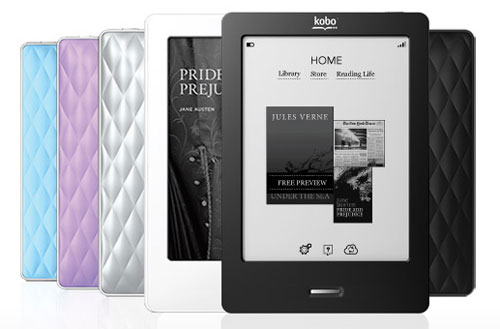
The new Kobo eReader

This is not a web app, but for those that like to read on an electronic device, the new Kobo Touch is a very nice addition to the eReader market. I recently acquired a Kobo Touch and immediately put it to use. It connects with the Chapters/Kobo online store and synced up to my Kobo account without any trouble at all. In fact, the built-in wifi is quite speedy compared to the previous version and the touch screen makes navigation a breeze. There is even a built-in bare-bones browser that lets me google quite nicely. Adding content from my own hard drive is a snap - simply drag the epub to the Kobo icon (not the program, the device) and the book shows up on the Kobo Touch home page. So easy.

Here is a recent review from Mike Koz:
http://goodereader.com/blog/electronic-readers/review-of-the-kobo-touch-e-reader/

Here is a video overview.