Doink is a VERY easy animator program, that allows you to make what is essentially a modern twist on the old-style flipcard booklet. Easy tools allow the user to draw in a frame, and then move to the next frame with a ghost of the first drawing still visible. This makes it very easy to make simple animations. Once you are done, a simple click on the play button lets the viewer see the final product.
You need at create an account to save your work, but you can capture the movie with Screencastle or Screencast-o-matic (http://screencast-o-matic.com/) If you create an account, animations can be also be posted to Facebook and Youtube.
"dotEPUBissoftware in the cloudthat allows you toconvert any webpage into an e-book."
Friends know I am an avid reader, and have many books around me at all times. Lately though, I find that I am reading more and more on my iPad. (I think I am hitting about 50% with the eVersions starting to win out!) It's easy to find content with all the eBookstores, but what about creating my own? One handicap has been the process of creating ePubs (the format I prefer on my Stanza app.) I know I can create ePubs using the latest version of Pages (which I don't have) or by running a conversion in Calibre. But what about doing it on the fly?
This is why I was so excited to find "dotePub" the other day. This tool works via a bookmarklet, great for my laptop or desktop, but it also works on the iPad itself. How perfect is that! Simply visit the site, add the bookmarklet to your menu bar, and start converting.
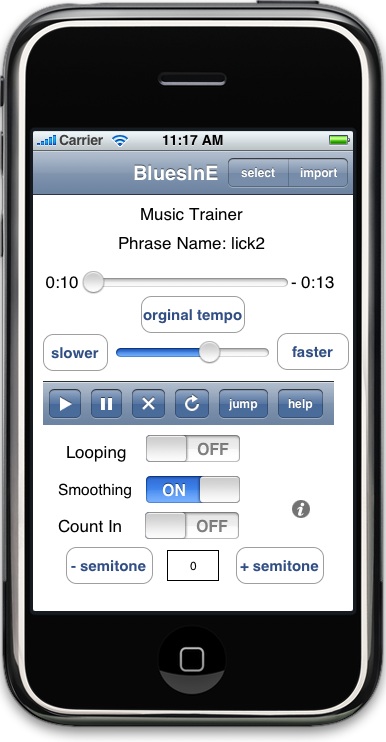
4 beat count in gives you time to move your hands back to your instrument
Displays elapsed and remaining time
Quickly cue song to play any where you want
Seamless integration with your devices built in iPod Music player allows you to access your entire music library!
The app is "free", but if you want to listen to more than 2 or 3 songs, then it costs $2.99 to upgrade. Could be a real boon to music teachers and music students. A great tool for learning a part or for analyzing a particular passage of music.
I've seen so much about QR codes on LM-NET these days, I thought I'd give them a plug here. They are a great way to raise the profile of your library program and give your displays a "cutting edge" feel.
Use them to point kids to your catalog, to reviews, to booktrailers and other interesting extras that connect with the materials you have in your collection. You could even make short video tutorials for equipment in your library, or how to create bibliographies, or....the sky's the limit. One recommendation was to create T-shirts graphics where the QR code is to the library website.
Check out the comic below from the daring librarian.
My district is looking at ways to integrate iPads into classroom instruction (like everyone else!) and I would like to "pick the collective brain" out there. I've put together a Google form (with a link to the resulting spreadsheet so everyone can see the contributions.)
Suggest your fav iPad Apps for classroom use by going to http://t.co/q4bDG9C .
(You can view the spreadsheet as it's being populated here: http://bit.ly/gquHAz )
You can download the results as an excel and then sort it any way you want (by price, by subject, by name.)
If you use Youtube videos, you know that sometimes you only really want to show certain portions. Or perhaps you want to crop, or zoom in, or quickly play back a section. EmbedPlus adds these features and more. (See some of the features below) This site could be a new "teachers' friend"! Scene Skipping Like DVD chapter buttons, click these to skip to marked times. Cropping Cut / Splice / Chop only the particularly interesting part of a video to show during playback. Movable Zoom Added accessibility. Dynamically magnifies the area you point over. Use it to get a close look at objects, writing, and things like moving athletes. Timed Annotations Add your own timed annotations to any video. Use it to display titles, captions, scene labels, and side comments during playback. Slo-Mo On-Demand Instantly watch videos at a slower rate to more clearly see what happens. Use it for videos with sports highlights, demos, tricks, and raw footage.
For those of you using iOS devices in the class, or thinking about it, here is a great list of apps, divided by subject area. Eric Sailers has put together this document with an eye to the needs of teachers and kids in Special Ed, but the results apply to all kids. Each app has a description and a link to the iTunes store. Take a look.
Ready for a walk down memory lane? I came across this site looking for audio software and couldn't resist posting about it. Here's the description from the home page. "Kiddie Records Weekly began in 2005 as a one year project devoted to celebrating the golden age of children's records. This period roughly spanned from the mid forties through the early fifties and produced a wealth of all-time classics. Many of these recordings were extravagant Hollywood productions and featured big time celebrities and composers." You can listen to a number of 45RPM Capitol Record stories, and download pages from the storybook. In some cases, the pictures and audio have been uploaded to Youtube.
If you want to add some audio to your webpage or blog, consider giving audioBoo a try. Signup is easy (you can use your Twitter account) and uploading audio is a snap from the browser, or an iPhone app. The resulting file can be easily embedded on your blog and the player is attractive and easy to use.
Using an iPad in your classroom? Then you need to be able to project your work on the big screen. First, get a VGA adapter for your iPad, and then start collecting apps that allow VGA output. (Not all apps do this, but that is changing all the time.) See below for some good candidates.
I recently came across two bookmarklets that I wanted to share with you. (As you probably remember from previous posts, a bookmarklet is a snippet of code that you drag to your browser's address bar. Every time you click it, it will cause the page you're viewing to change its appearance.) The first one I'd like to share is "Liquid Page". What I love about Liquid Page, is that it allows you to drag around the elements of any webpage you visit. It's a great way to rethink the layout of a page you're designing. With younger students, it can be used to play with a column of words as if they are fridge magnets, or rearrange images to group like items together. (Fun on a Smartboard!)
"Paper Case" is another useful bookmarklet. You can find it on the Liquid Mongoose site. Simply visit Netflix, Music.aol.com, or Picassa and click on your bookmarklet to create a pre-formatted page that you can print to hold your CDs. There's even a video tutorial to explain how it all works. (See below.)
There are lots of great resources for teachers to publish student work in a "book" format. Most allow for online viewing via embed codes. This allows parents, relatives and friends to view the work from anywhere. Most will also allow viewers to print out copies for saving and bragging.
Web based Solutions: SimpleBooklet Very easy set up. This can be used without an account. Lots of formats possible. Nice templates.http://simplebooklet.com Bookr
Bookr allows you to create picture flipbooks using Flickr images, and you can add your own text . (It is not printer friendly, but if you take screen shots, you can print.) Make note of the embed code and URL or you'll never find it again! http://www.pimpampum.net/bookr/ Scribd
Scribd allows you to upload docs, PPT, pdfs and view them/ embed them as an online book, slide show or scroll. You can print what you upload. You'll need an account to do this. www.scribd.com
Software Based Solutions
iPhoto
If you have access to iPhoto (mac) , you can use it to make a book, and add captions. Simply save as a PDF, then print the book or upload to some of the web based services.
Powerpoint
Students can make pages using individual slides. When printed out, they can be bound to create books. Saved as a PDF, the slides can also be uploaded to some of the web based services.
See also, (but some content may not be kid friendly)
Blurb www.blurb.com You can download their software to create beautiful photo books. Books can be viewed online, sold/purchased, and or printed
Issuu Upload your PDF creations to create flipbooks. www.issuu.com
I just read a post in TechCrunch by V. Wadhwa highlighting some of the problems associated with "googling" in the wild. It seems that spam and advertising seems to rise to the top everytime, contaminating the results. I've found that depending on the topic, a Google hunt can be quite a safari expedition! You have to be quite ruthless in filtering out the commercial sites with a series of "minus this" and "minus that". And I always have the sneaking suspicion that I've just eliminated the perfect site by doing so! Wadhwa offers a solution in the form of Blekko. (Here's the complete article.)
Here's how Wadwha describes it:
"Blekko was founded in 2007 by Rich Skrenta, Tom Annau, Mike Markson, and a bunch of former Google and Yahoo engineers. [...] In addition to providing regular search capabilities like Google’s, Blekko allows you to define what it calls “slashtags” and filter the information you retrieve according to your own criteria. Slashtags are mostly human-curated sets of websites built around a specific topic, such ashealth, finance, sports, tech, and colleges."
A quick look at the site makes me want to explore this "new" search engine. Might be a good addition to the research toolkit!
I usually prefer to review apps that teachers can use directly in the classroom with kids, but I couldn't pass up blogging about this one. True, not every kid will arrive with an iPhone, but the newest iPods and iPads will soon have cameras ( so this app could be used by more than just phone owners.) In some ways, watching this app in action is like watching magic! Word Lens translates from English to Spanish and vice versa "on the fly" via the camera. You see the street sign "magically" switch languages right on your phone screen. Although the dictionary is limited to two languages for the moment, this app has tremendous potential. Each language "pack" costs $4.99, and I imagine more languages will be available soon. I would love to see a version that works with Asian languages: Chinese, Japanese, Korean, etc.
While the translation is not perfect, I think it leverages the tremendous power that smartphones are placing in the pockets of many of our students.
Today I read a post in the School Library Journal by Christopher Bell talking about an online storytelling tool called "Storybird".
As the Storybird site explains, they "are short, art-inspired stories you make to share, read, and print. Read them like books, play them like games, and send them like greeting cards. They’re curiously fun." Christopher Bell agrees. (Here's a link to his blog post: LINK.) One of the great features is that you get to choose from a range of very nice artwork to build your story. Students get a very professional looking product right away. This allows more focus on the storytelling part of the task. A nice feature for the parents of budding authors is that the final version can be printed as a coffee-table book. (Perfect gift for Granny!) The only thing lacking is an embed feature and the nifty flash page flip found on other sites. (Although, this does make it more iPad friendly.) With a screen capture program, you could even record the student's voice as s/he narrates and flips pages, and then the resulting movie could be shared with others.