Earlier I wrote about Flipsnack as a way to present flippable books and magazines. In fact there is a whole family of "Snack Apps" to choose from. I tried Photosnack today and was very happy with the easy of use, and the ability to sign in using Google or Facebook rather than having to create a new account. It is a Freemium service, so to get all the features, you have to pay a little more. But it is a simple way to add a slick slide show to your blog or webpage.
My reflections on apps & tech -> for education, librarianship, assessment and learning design.
Thursday, September 29, 2011
Monday, September 26, 2011
Make Virtual Flipbooks the "Flipsnack" way
You can provide your students with beautiful flippable digital content by using Flipsnack. This great web-based app allows you to upload a PDF and see it rendered as a realistic onscreen book or magazine. You have a great set of choices for formatting and the full-screen view is very readable!
Monday, September 19, 2011
Popplet - mindmapping plus!
Popplet is an easy-to-use mindmap generator that creates slick conceptual maps. Add images, change the colour and embed your results on your blog or webpage. There is even a "play/presentation" feature that makes your Popplet work like a Prezi. Creations can be exported as image files. Worth taking a look at.
(Psst: It's also available for iPad in a lite version (free) and a paid version that allows you to create multiple boards, not just one.)
Here's a short Youtube demo.
Here's a sample project (Embedded version below)
=================
(Psst: It's also available for iPad in a lite version (free) and a paid version that allows you to create multiple boards, not just one.)
Here's a short Youtube demo.
Here's a sample project (Embedded version below)
=================
Thursday, September 15, 2011
Panoramas for fun and learning!
What better way to take students on learning journey than to visit world heritage sites, extreme environments or the actual setting of the novel they are studying. All this is possible when you access one of the many "Panorama" sites available on the internet.
These sites are repositories of an amazing variety of 360 VR movies that can transport a class to a place they can only imagine. And the experience has more impact than a simple picture. Teachers can pan across the scene, look up or down, and even zoom in on important details.
Here are four good sites to check out:
These sites are repositories of an amazing variety of 360 VR movies that can transport a class to a place they can only imagine. And the experience has more impact than a simple picture. Teachers can pan across the scene, look up or down, and even zoom in on important details.
Here are four good sites to check out:
And while we're on the topic of panoramas, I have to share the most recent app I've added to my iPhone collection: 360panorama. This handy inexpensive application uses your iPhone camera to make a 360 VR image in the time it takes for you to turn in a circle. The resulting file is uploaded to your free account on their server and can be shared on a webpage, facebook update or email. What a great way to set up instant mini-fieldtrips for your class. This is worth looking at.
(Thanks Nancy for this promo poster - Scribd document)
Thursday, September 8, 2011
Audio recording via a Web-based app
Check this out on Chirbit
Friday, September 2, 2011
Bibme Makes Bibliographies Effortless
The final task that students complain about the most when doing a project, is the bibliography. Maybe because they always forget to get complete bibliographic details when note-taking, or maybe because parsing citing info for websites is such a pain! And of course, who can remember where to put the commas, periods and indents. Writing a bibliography is an arcane art to most kids.
Enter "Bibme.org" This site takes all the fuss out of creating a citation, automating the process almost completely. Scan the ISBN of your reference, or type in the title, and presto, it's added to your list. Create a free account and you can even return to your growing bibliography to add references on the fly. Need APA instead of MLA? No problem: switch at the touch of a button. The site even extracts the relevant bits from URLs and adds them. Every student needs to know about this easy to use tool.
Tuesday, June 28, 2011
Drawing and Painting in the Browser window
Summer is almost here, and you may have a few blocks of time to cover in a computer lab before it's all over! Why not give your students a session with one of these "in browser" drawing/painting sites. Students can be creative and then save their art work for posting on a class site, or for printing as refrigerator art!
Artpad
http://artpad.art.com/artpad/painter/
Sketchy
http://mrdoob.com/projects/harmony/#sketchy
Crayola
http://www.crayola.com/coloring_application/index.cfm
Monday, June 20, 2011
Making your site mobile friendly
I spent the last few days looking for a way to make an existing site mobile friendly for use in a classroom with iTouch toting kids. Pages I had already created were so small and illegible. Yes, students can pinch and swipe to make the text larger, but I wanted the page to load "mobile ready". (The result.)
Short of re-creating my page from scratch (ie with a site like winksite or Wix.com) it seems I had very few options. I did find a google service that "cleans up" a page and makes it easier to view on a mobile device, but it applies this to every link on the page - sometimes that's not what you want! The readability site can work as a bookmarklet in Safari, but it can be tricky to explain, and in any case, doesn't happen automatically unless you purposefully select it. After much searching, I happened across a solution that works for me! Simply put, I take an existing page of links I had created for my students, make a copy of the file, and add the following code to the head of the document: (See code here)
This forces the mobile browser to view the page "close-up" and creates a very mobile friendly version.
Compare these two pages on a mobile device:
Thursday, June 16, 2011
The new Kobo eReader
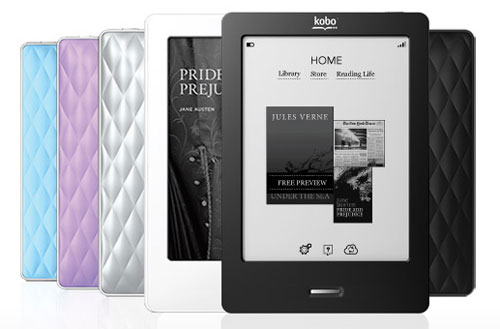
This is not a web app, but for those that like to read on an electronic device, the new Kobo Touch is a very nice addition to the eReader market. I recently acquired a Kobo Touch and immediately put it to use. It connects with the Chapters/Kobo online store and synced up to my Kobo account without any trouble at all. In fact, the built-in wifi is quite speedy compared to the previous version and the touch screen makes navigation a breeze. There is even a built-in bare-bones browser that lets me google quite nicely. Adding content from my own hard drive is a snap - simply drag the epub to the Kobo icon (not the program, the device) and the book shows up on the Kobo Touch home page. So easy.
Here is a recent review from Mike Koz:
http://goodereader.com/blog/electronic-readers/review-of-the-kobo-touch-e-reader/
Here is a video overview.
Here is a recent review from Mike Koz:
http://goodereader.com/blog/electronic-readers/review-of-the-kobo-touch-e-reader/
Here is a video overview.
Thursday, May 26, 2011
Making webpages "READABLE"
I've written about webpage clutter before. So many pages have such a wealth of links and widgets and boxes and what-not that it becomes a challenge to focus on the central content. This is an issue, especially if you are projecting an article for your class to discuss, or you have asked an easily distracted student to read from a webpage on his/her own. While there are some 3rd party tricks for fixing this (i.e. Readability), if you use Safari as your default browser, you can use the built-in 'READER" feature. While this is not a new feature - it has been around for a while - it is so easy to use. (FYI - Not every site will invoke the reader button.) One click on the reader button to the right of the URL address bar will deliver a clutter-free, resizable, printable view that makes reading a breeze. Aseem Kishor's blog "Switching to Mac" has a nice write-up on this feature. To switch back to the regular view, simply click on the "Reader" button again. So easy. (This is also a great plus for older eyesight!)
Monday, May 16, 2011
cl1p.net - The internet clipboard
Ever want an easy way to copy and paste text or links between computers? Cl1p.net allows users to easily pick up selected links on any internet enable computer. Create a "cl1p page", add whatever you want, share the URL with team members. So easy to use, and since there is no signin needed, students can use it quite easily. (You can create an account if you wish, to get more features.) Links expire after 1 week, unless you change the default. There is even the option of creating a bookmarklet for easy clipping. Just click the "Extras" link.
Monday, April 18, 2011
Making Flipbooks with a digital twist
Doink is a VERY easy animator program, that allows you to make what is essentially a modern twist on the old-style flipcard booklet. Easy tools allow the user to draw in a frame, and then move to the next frame with a ghost of the first drawing still visible. This makes it very easy to make simple animations. Once you are done, a simple click on the play button lets the viewer see the final product.
You need at create an account to save your work, but you can capture the movie with Screencastle or Screencast-o-matic (http://screencast-o-matic.com/) If you create an account, animations can be also be posted to Facebook and Youtube.
Tuesday, March 15, 2011
Creating ePubs on the fly

"dotEPUB is software in the cloud that allows you to convert any webpage into an e-book."
Friends know I am an avid reader, and have many books around me at all times. Lately though, I find that I am reading more and more on my iPad. (I think I am hitting about 50% with the eVersions starting to win out!) It's easy to find content with all the eBookstores, but what about creating my own? One handicap has been the process of creating ePubs (the format I prefer on my Stanza app.) I know I can create ePubs using the latest version of Pages (which I don't have) or by running a conversion in Calibre. But what about doing it on the fly?
This is why I was so excited to find "dotePub" the other day. This tool works via a bookmarklet, great for my laptop or desktop, but it also works on the iPad itself. How perfect is that! Simply visit the site, add the bookmarklet to your menu bar, and start converting.
You can view "how to videos" on the site as well.
Friends know I am an avid reader, and have many books around me at all times. Lately though, I find that I am reading more and more on my iPad. (I think I am hitting about 50% with the eVersions starting to win out!) It's easy to find content with all the eBookstores, but what about creating my own? One handicap has been the process of creating ePubs (the format I prefer on my Stanza app.) I know I can create ePubs using the latest version of Pages (which I don't have) or by running a conversion in Calibre. But what about doing it on the fly?
This is why I was so excited to find "dotePub" the other day. This tool works via a bookmarklet, great for my laptop or desktop, but it also works on the iPad itself. How perfect is that! Simply visit the site, add the bookmarklet to your menu bar, and start converting.
You can view "how to videos" on the site as well.
Friday, March 11, 2011
Music App for iTouch, iPad
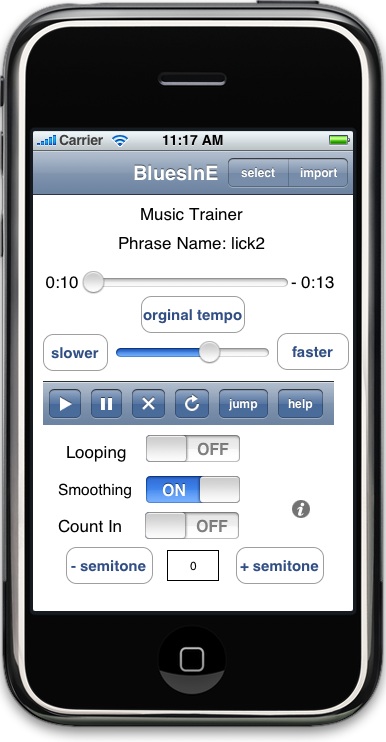
here's a great iTouch/iPad app I found:
"Slow Down Music Player"
(Web site here)
Here are some of the specs
The app is "free", but if you want to listen to more than 2 or 3 songs, then it costs $2.99 to upgrade. Could be a real boon to music teachers and music students. A great tool for learning a part or for analyzing a particular passage of music.
"Slow Down Music Player"
(Web site here)
Here are some of the specs
- Change tuning or musical key
- Loop phrases or entire song
- Easy to define and save phrases
- 4 beat count in gives you time to move your hands back to your instrument
- Displays elapsed and remaining time
- Quickly cue song to play any where you want
- Seamless integration with your devices built in iPod Music player allows you to access your entire music library!
The app is "free", but if you want to listen to more than 2 or 3 songs, then it costs $2.99 to upgrade. Could be a real boon to music teachers and music students. A great tool for learning a part or for analyzing a particular passage of music.
Thursday, March 3, 2011
QR Codes...everywhere!
![]() |
| QR Code to our list of Library Catalogs. |
Use them to point kids to your catalog, to reviews, to booktrailers and other interesting extras that connect with the materials you have in your collection. You could even make short video tutorials for equipment in your library, or how to create bibliographies, or....the sky's the limit. One recommendation was to create T-shirts graphics where the QR code is to the library website.
Check out the comic below from the daring librarian.
Subscribe to:
Posts (Atom)


